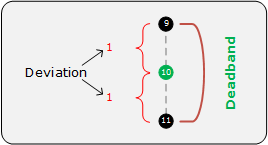
The History Deadband compression method is a second method for reducing the number of historical real-time values reported to the CygNet Historian (VHS). This method acts sequentially as data values are received by all CygNet CVSs. If a point’s value exceeds the configured deadband range it will be reported to the VHS. The deadband is a literal value, not a percentage value. In the following diagram the deviation is set at 1, with the deadband equal to 2.
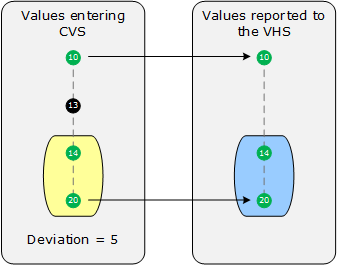
If a point has a history deadband value configured, the previous value in the CVS before "leaving" the deadband range is sent to the VHS, as well as the next value that causes the deadband range to be exceeded. The following diagram shows which values will be sent to the VHS, assuming a deviation of 5, with incoming values of 10,13,14, and 20. The colored areas indicate that the values of 14 and 20 will be sent to the VHS at the same time when the value of 20 comes in to the CVS.
Considerations for Maximum reporting interval and Minimum evaluation time will be evaluated before applying the compression settings. For example, if a new value is received by the CVS that exceeds the configured Maximum reporting interval, it will be sent to the VHS directly regardless of whether it exceeds any compression settings. Additionally, new values will always be sent to the VHS if their status bits have changed from one value update to the next, or if the timestamp of the new value received is older than the previously received value.
The History Deadband compression and its associated deadband range (deviation) are configured on the History page of the point configuration record.
The following simple example compares the same points with no history deadband (0) and a small history deadband value (0.5).
Assume the following values are received by the CVS:
1 @ 1:00:00
2 @ 1:00:05
2 @ 1:00:10
2 @ 1:00:15
3 @ 1:00:20
For a point configured without deadbanding (value of 0), the following values will be sent to the VHS:
1 @ 1:00:00
2 @ 1:00:05
3 @ 1:00:20
For a point configured with a history deadband value of 0.5, the following values will be sent to the VHS:
1 @ 1:00:00
2 @ 1:00:05
2 @ 1:00:15
3 @ 1:00:20
This simple example provides a visual aid for trending and gives a sense of the time interval between data points. Once you understand the basics, it’s easy to predict more complex examples:
For a deadband range set at 0.2, only the values in bold are sent to the VHS:
1 -> 2 -> 2.1 -> 2.2 -> 2.1 -> 2.3 -> 2.6 -> 4
For a deadband range set at 0.1, only the values in bold are sent to the VHS:
1 -> 2 -> 3 -> 3.1 -> 3.2 -> 3.5 -> 4 -> 6 -> 6.1 -> 10
1 -> 2 -> 2.1 -> 2 -> 3
For historical data that has already been written to the historian (uncompressed), the data can be thinned with the Deadband compression method via the VHS Data Thinner Utility.

|
|
|

